If you're new to Meteor Scatter or even Amateur Radio, I'd suggest reading the introductory article on Meteor Scatter located here.
Bands/Frequencies.
Meteor Scatter operation can be acheived on the following VHF bands:
Firstly, I'll explain why I've included 10M 28MHz in the
list of VHF Bands, as experienced Amateur Radio Operators we know that 28MHz is
at the top end of the HF Spectrum, however it is a bit of a strange band as it
exhibits many behaviours of a VHF band such as being able to work Sporadic E
layer openings, Tropospheric Ducting and in the case of this article, Meteor
Scatter.
But how do we know we're actually communicating with another station on 28MHz
using Meteor Scatter and not Sporadic E or F2 Layer propagation modes?
Well as experienced operators who've used VHF and operated MS on the higher
bands will know that, the difference between an MS ping or burst is characterised
by duration, intensity and as previously discussed, Doppler Shift.
Let’s take an example of two stations working an MS Sked on 10M, one located in
the UK and the other located in Germany, they're setup and ready on 28.145MHz (the
non-official MS centre of activity, we'll discuss this further on) using
the MSK144 Data mode on a 15 Second Transmit/Receive Sequence Duration.
When the station based in the UK receives a burst of data from the station in
Germany, this burst may last the full period of the 15 second receive cycle and
may also see the same long burst during the next receive cycle thus this would
indicate another mode of radio wave propagation is at work here, such as
Sporadic E or Tropospheric Ducting.
If however on the receive cycles, each station is noting several seconds of a
received burst of data, let’s say 2 or 7 seconds long with varying intensity
then this is most probably a Meteor reflection.
It’s also interesting to understand that as you go up in frequency from 28MHz
to the 6 Metre band, 50MHz, the duration of the Meteor Reflections get shorter,
what would be a 3 or 5 second burst on 28MHz may well only be a 1 or 2 second
burst on 50MHz and the same reduced duration the higher you go - 144Mhz, the 2M
VHF band is a more challenging band outside of any major Meteor Shower as the
duration of Meteor reflections are much shorter, however the advantage of the
2M band is that you have physically smaller antenna systems with higher gain
compared to the lower bands.
In the next section of this article, I'll outline the minimum equipment
required to get started operating Meteor Scatter communications.
Equipment.
Before you decide what band you're going to get setup on for
MS, there a few things to consider that'll dictate financial cost and operating
success.
Firstly let’s look at the antenna, because this'll dictate how successful
you'll be to a large degree, especially outside of major Meteor Showers - It
would get very boring if you had to wait 3 months for a major Meteor Shower to
occur before you could have any MS QSO's.
28MHz, 10M Band you can get started with a simple 2 Element
directional antenna like a Moxon Beam, these are fairly lightweight and have a
smaller footprint than a standard Yagi at 28MHz.
Almost every Amateur Radio operator has an SSB Radio capable of 28MHz with 100W
transmitter output power, which at this frequency is more than enough to have
successful Meteor Scatter contacts both in and outside of majors showers -
However there is a but...
When operating an MS QSO your radio will be transmitting at 100% duty cycle on
each transmit cycle, so make sure you have adequate forced air cooling for the
transceiver, the better option and at the lower frequencies more affordable
option is to use a fan cooled Linear Amplifier, doesn't have to be an expensive
one but the key here is to keep the radio as cool as possible, so put the load
on an external amplifier that is forced cooled - Also more power is better,
I'll touch on this point further on in the article.
As the 10M, 28MHz band is rarely used for Meteor Scatter operations, it
generally isn't the go-to band to get started with MS, however it is certainly
gaining interest and there are a few stations around the UK and Europe who actively
monitor the unofficial MS centre of activity, 28.145MHz using the MSK144 data
mode so it's worth keeping this band in mind.
50MHz, 6M Band is probably the easiest band to get started with
MS as most modern transceivers come with 50MHz as standard and again, as stated
above, 100W and a 2 element directional antenna is enough to see some fairly
successful contacts.
However, at 50MHz due to the smaller antenna size it wouldn't be unreasonable
to think about putting up a 3 or 4 element Yagi, still fairly lightweight but
you'll have much more gain on both transmit and receive.
70MHz, 4M Band is a brilliant band for Meteor Scatter, smaller antenna
size means you can increase the element count over say a 10M or 6M Yagi, the
downside to 70MHz 4M band is the lack of readymade equipment, but that isn't an
issue for technical operators as we can generally build our own.
In recent years with the advancement in technology has seen the likes of the
Icom 7300 hit the market which comes as standard with the 70MHz 4M band, so its
not as difficult a band to get started with these days.
Couple of things to note however, as previously stated, the higher up in
frequency you go, the more challenging Meteor Scatter contacts will become due
to the short duration of the Meteor reflections.
144MHz, 2M Band This is a very interesting band for Meteor Scatter and
as far as antenna systems go you can achieve a lot of gain due to the smaller
physical footprint of a 144MHz directional antenna, the downside is that your
system must be designed carefully with particular attention paid to coaxial
feeder lengths and quality.
At this frequency, every fraction of a decibel counts and you must minimise the
losses on both receive and transmit, so the general rule is use high quality,
low loss coaxial cable between the radio and antenna and keep the length as low
as possible too - Shorter the better!
At these frequencies, transmitter power is key and put simply the more the
better, 100W and a 5 Element Yagi antenna will work well during a major shower
such as the Geminids but you'll struggle outside of these showers and find that
although you'll receive another more powerful station, they'll struggle to
receive you.
A bigger financial investment is required for the 2M band and I'll list below a
suggested setup that'll give you fairly good all year round results.
The list of suggested equipment is purely based on what I
own and use or have used previously, there are other makes and models of
equipment that can be cheaper or more expensive depending on your budget.
If you're happy to work Meteor Scatter only during the major showers then you
can stick with a 100W Transceiver and a smaller antenna, this will give great
results during the Geminids, for example.
My current setup consists of the following equipment
My next setup once the upgrade has been completed will consist of the following
Suggested Cable types to consider for this band would be as follows:
The above-mentioned cables are a few examples of what is
available and what I've experienced using myself, however, do your own shopping
and research first although just keep in mind your primary goal is low loss.
The hardline products require specialist tools to install coaxial connectors,
and both the cable and installation tools are expensive as are the connectors,
for most basic getting started setups Ultraflex 10, LMR400 type cables are
adequate.
Depending on the type of VHF SSB Transceiver you own or plan
to buy, you'll have one of several ways to interface the computer to it, on
most modern radio's it’s all done with a simple USB cable with the likes of the
Icom IC 9700 and IC 7300 rigs, however if you own an older radio you may need a
soundcard interface to connect the radios accessory socket or even the mic and
external speaker jacks.
Whichever route you take in order to interface your transceiver to your
computer, the primary goal here is to allow the computer to send and receive
the required data packets for an MS QSO through your radio.
So lets summarise at this point on equipment.
The lower bands are more cost effective to get going with
Meteor Scatter operations, downside is antenna size and weight.
The higher bands are more expensive to get going in terms of an all year round
setup and require more thought around design, however on the upside, antenna
systems are smaller and lighter and you can stack multiple antennas to increase
transmitted and received gain (This will be covered in a separate article).
3. Operating Procedure.
I'll discuss the standard MS operating procedure in this
section with a few examples of contacts I've made using Meteor Scatter and for
the purposes of this article I'll only be making reference to the MSHV Data
mode software designed and provided by Christo, LZ2HV.
I'll also discuss the different data modes available in the software and their
use cases, however the primary focus will be on using the following modes:
To get started with an MS QSO, you have two options:
1. Tune your radio to the Meteor Scatter calling frequency and configure the
MSHV software to call CQ.
2. Arrange a Sked with another station on a particular frequency and data mode.
Option 1 is more common during a major Meteor Shower such as the Geminids,
however I've had many successful contacts by calling CQ with no prior arranged
Sked.
Option 2 arrange a Sked, but what is a "Sked" you may ask?
Well it’s an abbreviated term for a Scheduled Contact and this is normally
arranged by using an internet based chatroom, the main one being used today is provided
by a Radio Amateur ON4KST whose website-based chatroom is available free to use
(link in the resources
section below).
There is also a much more feature-rich software package written by Nick, US8AR
called KST Chat which uses the ON4KST Chat Server but Nick's software provides
much more functionality and is kindly provided free of charge to the HAM Radio
community, download link in the resources
section below.
FSK441
FSK441 uses four-tone frequency shift keying at 441 baud.
The frequencies of the audio tones are 882, 1323, 1764, and 2205 Hz. Each
encoded character uses three tone intervals and therefore requires 3/441
seconds (approximately 2.3 ms) for transmission. FSK441 accommodates an
alphabet of 43 characters.
FSK441 is a great mode and its my go-to choice for Meteor Scatter operating due
to its inherent capability to allow for partial decoding of messages,
especially at 144MHz where MS reflections can be very short and weak in signal strength.

Example of an FSK441 Meteor burst being received
JTMS
JTMS uses Minimum Shift Keying (MSK) at 11025 / 8 = 1378.125
baud. Messages are free-form and have lengths 5,7,9,11,13,17,19,23 or 29
characters, padded when required with one or more trailing blanks. Characters
are mapped to numerical values in the range 0 to 63 according to position in
the first line below. (The second and third lines may be used to read off an
index value: for example, B has the value 11 and ? is 38.).
Again, another favourite of mine and is very similar to FSK441 behaviour,
however JTMS will produce less "garbage" decodes at lower signal
levels compared to FSK441.

Example of an JTMS Meteor burst being received
MSK144
MSK stands for minimum shift keying, a form of
continuous-phase frequency-shift keying (FSK) with shift equal to half the baud
rate. MSK144 uses message frames of 144 bits and modulation at tone frequencies
1000 and 2000 Hz to transmit channel symbols at keying rate of 2000 baud.
This mode differs in several ways from FSK441 and JTMS, MSK144 is a
semi-automated mode by way it'll automatically decode a received MS ping in real-time
during the receive cycle and set the transmit cycle to the next stage, however
unlike JTMS and FSK441, MSK144 will not offer a partial decode or decode anything
below a certain signal strength making it useless for weak signal MS work
outside of a major shower.
MSK144 is very good during a shower like the Geminids because it'll allow for
rapid, semi-automated contacts to be made or in a pile-up situation it can
prove a very useful tool.

Example of an MSK144 Meteor burst being received
So now that we understand a little more about the various data modes available to us and how they differ in application, lets go through the standard operating procedure prior to getting on the air so you have a clear understanding of how to play the game.
I'll try and keep this as brief and clear as possible, if
any more experienced readers feel I've made an error or would like more context
added that may be of benefit to a newcomer, please feel free to get in touch.
Arrange a Sked
Using the KST Chat software or the ON4KST Website Chatroom, make contact with another active user and ask if they would like to have a sked, propose and agree a frequency and data mode.
Configure the QSO
Take note of the station you're in the sked with and add their callsign and Maidenhead Locator to the MSHV software, in the following examples we'll use an FSK441 MS Sked.
As a rule of thumb, if the station you're going to be working is East of your location then you will transmit in the second period and if the station is West of your location, you transmit in the first period, this is controlled by the TX FIRST - TX SECOND radio buttons in the MSHV software.
Typical Checklist

Confirm the Sked
Now you've configured the software and radio for the QSO, return to where the Sked was arranged e.g. KST Chat, SMS, WhatsApp etc and confirm back the QSO settings with the other operator so you're both in agreement and there's no chance of incorrect configuration or doubt.
Run
Once you're ready, notify the other operator you're running and simply click the AUTO IS OFF button in the MSHV software, which will turn on AUTO TX/RX cycling at the period set e.g. You'll transmit for 30 seconds and receive for 30 seconds either in the first or second period as agreed in the Sked.
Monitor QSO
MSHV will try and automatically decode meteor pings or
bursts, but sometimes you have to do it manually, so if you hear a
"zap" or "ping" in the radio speaker when receiving, use
the computer mouse to click inside the waterfall in the MSHV software which
should show you something like in the image below:

Once you've read the decoded message, you must then advance the QSO on to the next stage, in the above example I decoded Peter, SM2CEW which was a fairly loud burst of data, now I would send him my report, in this case the report was 48.
I changed the report from the default 26 to 48 to correctly report his signal, you can do this in the software by simply taking note of the report in the MSHV window in the "Rpt" column and entering it in the TX RPT box and re-generating the TX messages by clicking on the GEN MSG button again, then once this is complete move the TX sequence on to the next stage which would be TX2 in this example.
Now I'm transmitting the following message to Peter, SM2CEW M0XXQ 48 48, assuming once Peter receives this message from me, he would then advance his TX Sequence to acknowledge the report by sending back my report, assuming Peter decoded my signal with a report of 28 he would reply R28 with the following example message: M0XXQ SM2CEW R28 R28
See the image below as an example:
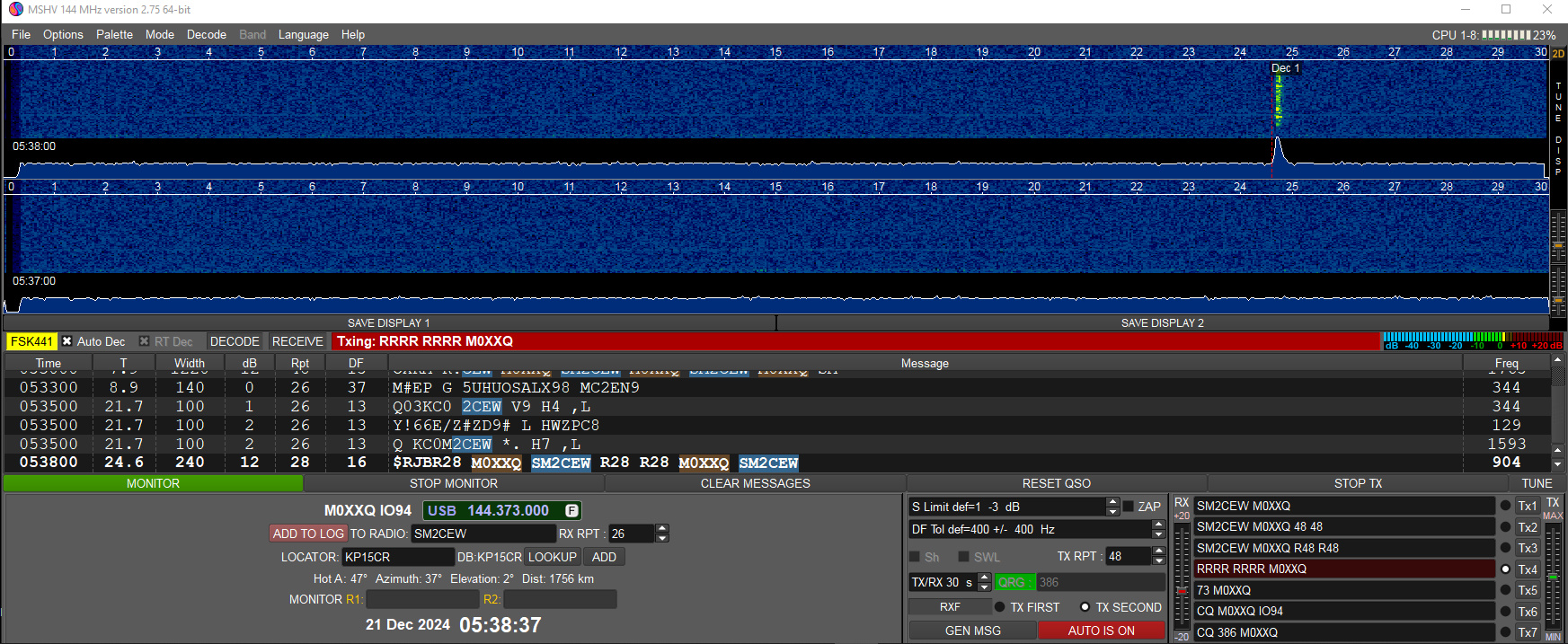
Now that I've received Peters report back to me, I must send my final transmit sequence which formalises and completes the MS QSO in the following format: RRRR RRRR M0XXQ
Once Peter receives this message the QSO is complete, it is not required to send 73 message in order to make the QSO valid, although many operators do this as a courtesy.
Complete QSO
Now I would head back to the source of the Sked, in most cases KST Chat, and wait for Peter to messge me in the chat to say he's received my final RRR message, at this point a log entry will be made and a report sent to the DX Cluster to record the MS QSO and we'd typically exchange greetings and finish at this point.
I want to to thank you for this excellent read!!
I certainly loved every little bit of it.
I have you book-marked to check out new things you post…